
Photometric determination of copper in soil using Cuprizon subsequent to acid extraction
Introduction
Soil analysis of copper important due to its role as an essential plant micronutrient involved in metabolic processes such as photosynthesis, respiration, and protein synthesis.1 However, elevated copper levels can negatively affect plant growth and productivity, including impacts on germination and physiological processes.2 Copper contamination in agricultural soils is common and is associated with the use of fertilizers, pesticides, and copper-based fungicides, making its monitoring important.
A range of analytical methods is available for copper determination, including atomic absorption spectroscopy and inductively coupled plasma techniques. Photometric methods based on complex formation provide an alternative approach for copper analysis following extraction.
Applicable sample
Soil samples
Reagents, instruments, and materials
Test /Reagent kit(s)
For the measurement one of the following Spectroquant® test kits is necessary.
Instrument(s) and devices
For the measurement one of the following Spectroquant® photometers is necessary:
- Spectroquant® VIS Spectrophotometer Prove 100 plus (1.73026)
- Spectroquant® UV/VIS Spectrophotometer Prove 300 plus (1.73027)
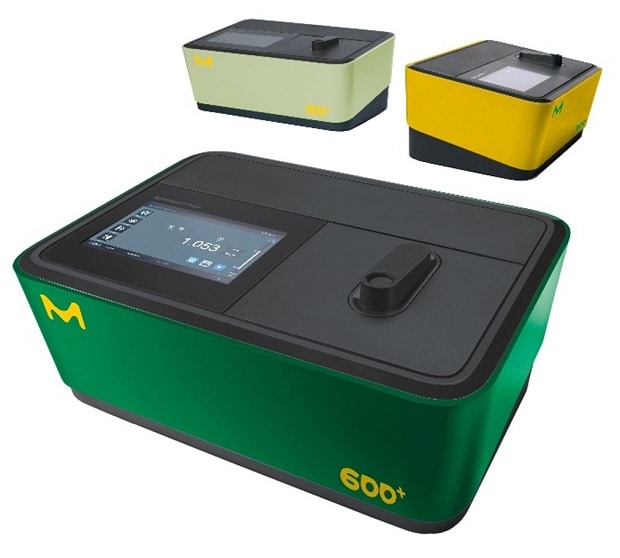
- Spectroquant® UV/VIS Spectrophotometer Prove 600 plus (1.73028)
- Spectroquant® Colorimeter Move 100 (1.73632)
Note: Also, legacy Spectroquant® instruments are suitable.
Software for data transfer
Optional Spectroquant® Prove Connect to LIMS software package (Y.11086) to transfer your data into an existing LIMS system.
Instrument accessories
- Rectangular cell 10 mm (1.14946)
- Rectangular cells 20 mm (1.14947)
- Rectangular cells 50 mm (1.14944)
Other reagents and accessories
- Nitric acid 65 % for analysis (1.00456)
- Ammonia 25 % for analysis (1.05432)
- MQuant® pH-indicator strips pH 7.5 – 14 (1.09532)
- Water for analysis (1.16754)
- Analytical balance
- Standard laboratory glassware (e.g., glass beakers) and pipettes
- Shaker
- Sieve
- Heating plate
- Folded filter
Analytical procedure
For more information on the measurement, see the packaging insert for the test.
Sample preparation
- In a 200 mL Erlenmeyer flask place 10 g of air dried and sieved (mesh 2 mm) sample, with 30 mL water for analysis and 10 mL nitric acid 65 % and heat for 1 hour.
- After cooling slowly and under swinging add 23 mL ammonia 25 %. The pH - value should be 9 - 10 (check with pH-indicator strips).
- Filter off the insoluble parts and wash the filter 3 times with water for analysis.
- Collect the filtrate and the washings in a 200-mL volumetric flask, fill up to volume with water for analysis and mix well.
Using cat. no. 1.14543: procedure and measurement
For more information on the measurement, see the packaging insert for the test.
Procedure
- Pipette 5.0 mL Pretreated sample into a reaction cell, close the cell, and mix. The pH must be within the range 7.0 - 9.5. Check with MQuant® pH-indicator strips.
- Add 5 drops Reagent Cu-1K, close the cell tightly, and mix. Hold the bottle vertically while adding the reagent!
- Leave to stand for 5 min (reaction time), then measure the sample in the photometer.
Measurement
- For photometric measurement the cells must be clean. Wipe, if necessary, with a clean dry cloth.
- Measurement of turbid solutions yields false-high readings.
- The pH of the measurement solution must be within the range 7.0 - 9.5.
- The color of the measurement solution remains stable for at least 30 min after the end of the reaction time stated above. (After 45 min the measurement value would have diminished by 5%.)
- In the event of copper concentrations exceeding 50 mg/l, other reaction products are formed, and false-low readings are yielded. In such cases it is advisable to conduct a plausibility check of the measurement results by diluting the sample (1:10, 1:100).
Hints for measurement
- It is recommended to zero the method each new working day. To do this, open the method, either by manually selecting the method or by inserting a barcoded cell. Tap the <Settings> button and select the <ZERO ADJUSTMENT> menu item. After prompting, insert the 16 mm zero cell through the corresponding opening. The zero adjustment is performed automatically. Confirm the performance of the zero-adjustment procedure by clicking on <OK>.
- After the zero has been performed, insert the barcoded Spectroquant® round cell through the corresponding opening, ensuring that the white position mark on the cell is aligned with the positioning mark on the spectrophotometer. The measurement starts automatically.
- Read off the result in mg/L from the display.
Hint: The above written measurement description is only valid for the Spectroquant® Prove (plus) series photometer. If a different instrument is used, please consult the corresponding instrument manual for more details on how to perform the measurement.
Using cat. no. 1.14767: procedure and measurement
For more information on the measurement, see the packaging insert for the test.
Procedure
- Pipette 5.0 mL Pretreated sample into a test tube.
- Add 1 level green dosing spoon Reagent Cu-1 and shake vigorously until the reagent is completely dissolved.
- The pH must be within the range 7.0 - 9.5. Check with MQuant® pH-indicator strips.
- Add 5 drops Reagent Cu-2 and mix. Hold the bottle vertically while adding the reagent!
- Leave to stand for 5 min (reaction time), then fill the sample into the cell, and measure in the photometer.
Note: For measurement in the 50-mm cell only the sample volume must be doubled. Alternatively, the semi-microcell (1.73502) can be used. It is recommended to measure against an own prepared blank sample (preparation as per measurement sample, but with distilled water instead of sample) to increase the accuracy. Configure the photometer for blank measurement .
Measurement
- Certain photometers may require a blank (preparation as per measurement sample, but with distilled water instead of sample).
- For photometric measurement the cells must be clean. Wipe, if necessary, with a clean dry cloth.
- The pH of the measurement solution must be within the range 7.0 - 9.5.
- The color of the measurement solution remains stable for at least 30 min after the end of the reaction time stated above. (After 45 min the measurement value would have diminished by 5%.)
- In the event of copper concentrations exceeding 50 mg/L, other reaction products are formed, and false-low readings are yielded. In such cases it is advisable to conduct a plausibility check of the measurement results by diluting the sample (1:10, 1:100).
Hints for measurement
- It is recommended to zero the method for each new working day. To do this, open the method by inserting the barcode, tap the <Settings> button and select the <ZERO ADJUSTMENT> menu item. Fill the same cell which will be used for the sample measurement with distilled water. After prompting, insert the filled rectangular cell into the cell compartment. The zero adjustment is performed automatically. Confirm the performance of the zero-adjustment procedure by clicking on <OK>.
- After the zero adjustment, fill the measurement sample into the same or a matched rectangular cell and insert the cell into the cell compartment. The measurement starts automatically.
- Read off the result in mg/L from the display.
Hint: The above written measurement description is only valid for the Spectroquant® Prove (plus) series photometer. If a different instrument is used, please consult the corresponding instrument manual for more details on how to perform the measurement.
Analytical quality assurance
Analytical quality assurance (AQA) is recommended before each measurement series.
To check the photometric measurement system (test reagents, measurement device, handling) and the mode of working, Spectroquant® CombiCheck 90 can be used. Besides a standard solution with 2.00 mg/L Cu2+, this article also contains an addition solution for determining sample-dependent interferences (matrix effects).
Sample-dependent interferences (matrix effects) can be determined by means of standard addition or dilution.
To view additional notes, visit SigmaAldrich.com/qa-test-kits.
Calculation
Copper content in mg/kg Cu = analysis value in mg/L Cu x 20